Connect to NebulaGraph Database Developer Edition
Connect NebulaGraph Studio to NebulaGraph Database Developer Edition by following the steps below.
Prerequisites
- NebulaGraph Studio is installed. For more information, see Install NebulaGraph Studio.
- A NebulaGraph Database Developer Edition service group is running. For more information, see Getting started.
Steps
-
Enter
http://<ip_address>:7001/into the address bar of your browser.Replace
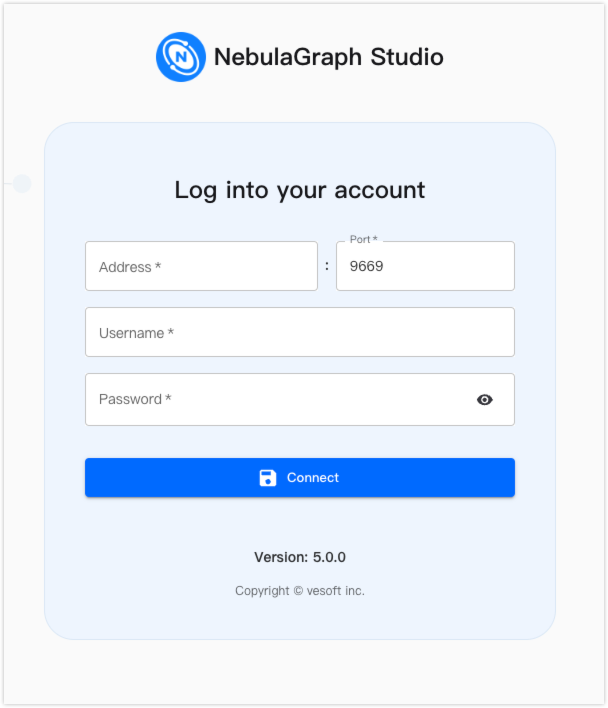
<ip_address>with the IP address of the machine where NebulaGraph Studio is installed. The port7001is the default port of NebulaGraph Studio.The following login page is displayed if NebulaGraph Studio is running properly.
-
Specify the following fields on the login page:
- Address: Enter the IP address of the Graph service of NebulaGraph Database Developer Edition.
- Port: Enter the port of the Graph service. Default value:
9669. - Username: Enter the username of the Graph service. Default value:
root. - Password: Enter the NebulaGraph Database Developer Edition user's password.
-
Click Connect to connect to NebulaGraph Database Developer Edition.
What's next
After the connection is established, you can use NebulaGraph Studio to perform the following operations:
- Manage graph types
- Manage graphs
- Use the console to run GQL statements
- Use graph exploration to query and explore data relationships.