Weakly Connected Components (WCC)
Algorithm introduction
Weakly Connected Components identify groups of nodes in a directed graph where each pair of nodes within a group is connected via some path if edge directions are ignored. In other words, after replacing all directed edges by undirected ones, a weakly connected component is a maximal set of nodes such that each node is reachable from any other node in the set.
A common way to compute WCC is label propagation:
- Initialize each node’s label to its own ID.
- Iteratively relax labels by propagating the smallest label across undirected edges.
- When no node can be updated with a smaller label, all nodes bearing the same label belong to the same weakly connected component. That is, all nodes in the same weakly connected component have the same label, and the label is equal to the minimum ID of the nodes in the component.
For more information about WCC, see Component (graph theory).
Data model
To implement the WCC algorithm in GQL, the following data model is used to create a graph type:
- Persons are represented by nodes of type
Person. - Relationships between persons are represented by edges of type
Knows.
Although the Knows edges are stored as directed, the WCC algorithm treats them as undirected during matching to correctly find weak connectivity.
For the complete definition of the graph type, see Prepare graph data.
Procedure implementation
To compute the weakly connected components of a graph, we create a procedure that performs label propagation until convergence.
For the complete definition of the procedure, see Create a procedure. The following section describes the key elements of the procedure and how it works.
The procedure takes no input parameters and the following variables are defined within the procedure:
| Variable | Type | Description |
|---|---|---|
component_id |
Node-attached MinAgg aggregator value variable | The current label of each node (initialized to the ID of the node). The MinAgg aggregator ensures a node keeps the minimum label. |
comp_count |
Global MapAgg aggregator value variable | A map to count the number of nodes in each component. |
new_active |
Global OrAgg aggregator value variable | A global boolean flag indicating whether any update occurred in the current iteration; determines whether to continue iterating. |
v_set |
Active set variable | The active set of nodes to be processed in the next iteration, limiting iteration to nodes affected by updates. |
output_file_node and output_file_count |
File variable | The former is used to export the final component ID of each node, and the latter is used to export the number of nodes in each component. |
result_table |
Table variable | A temporary table to collect the final component ID of each node for aggregation and return. |
The following steps outline the logic of the procedure:
- For each node, initialize its
component_idto its own ID. Initialize the active setv_setwith all nodes. - Repeat while
new_activeistrue:- Reset
new_activetofalse. - For each undirected edge (
a—b), whereais in the current active set, ifa.component_id<b.component_id, updateb.component_idto the minimum value (viaMinAgg) and setnew_activetotrue. - Move each updated node
binto the active setv_setfor the next iteration.
- Reset
- After convergence (no updates), export each node’s ID and final
component_idinto a file or table by using the file variable (output_file_nodeandoutput_file_count) or the table variable (result_table). - Group nodes with the same
component_idand return the count of nodes for eachcomponent_id.
Steps
Run the following code blocks in order in the NebulaGraph Studio CONSOLE. For first-time setup, follow Prepare algorithm sample data to check where to run commands and how the directory is mounted.
1. Prepare graph data
-
Create a graph type that matches your data model.
''' CREATE GRAPH TYPE IF NOT EXISTS wcc_graph_type AS { NODE Person (LABEL Person {id INT PRIMARY KEY}), EDGE Knows (Person)-[LABEL Knows {MULTIEDGE KEY ()}]->(Person) } ''' -
Download these CSV files and save them with their original names in
examples/algorithms/wcc/under your deployment directory:- wcc_node.csv: Node data.
- wcc_edge.csv: Edge data.
Preview the CSV files
wcc_node.csvid 1 2 3 4 5 6 7 8 9 10 11 12 13 14 15 16 17 18 19 20 21 22 23 24 25 26 27 28 29 30wcc_edge.csvsrc,dst 1,2 2,3 2,4 4,5 5,1 6,7 6,8 8,9 9,10 10,7 11,12 13,15 15,11 12,11 14,11 17,16 16,18 18,19 20,19 20,1 20,21 21,22 22,23 23,24 24,25 27,26 26,27 27,28 28,29 -
Create a temporary graph based on the graph type and load the data files into the temporary graph.
CREATE TEMPORARY GRAPH IF NOT EXISTS #wcc_graph TYPED wcc_graph_type''' USE #wcc_graph IMPORT INTO GRAPH { NODE (v@Person {id: id}) FROM DATAFILE { PATH: "file:///examples/algorithms/wcc/wcc_node.csv", FORMAT: "CSV", DELIMITER: ',' }, EDGE (id: src)-[e@Knows{}]->(id: dst) FROM DATAFILE { PATH: "file:///examples/algorithms/wcc/wcc_edge.csv", FORMAT: "CSV", DELIMITER: ',' } } '''After the import succeeds, run this query in the console to check the node count:
'''
USE #wcc_graph
MATCH (n)
RETURN count(n) AS node_count
'''
The expected
node_countis30. If it differs, check the files and import results before continuing.The relationship between nodes in the temporary graph
#wcc_graphis shown in the figure below: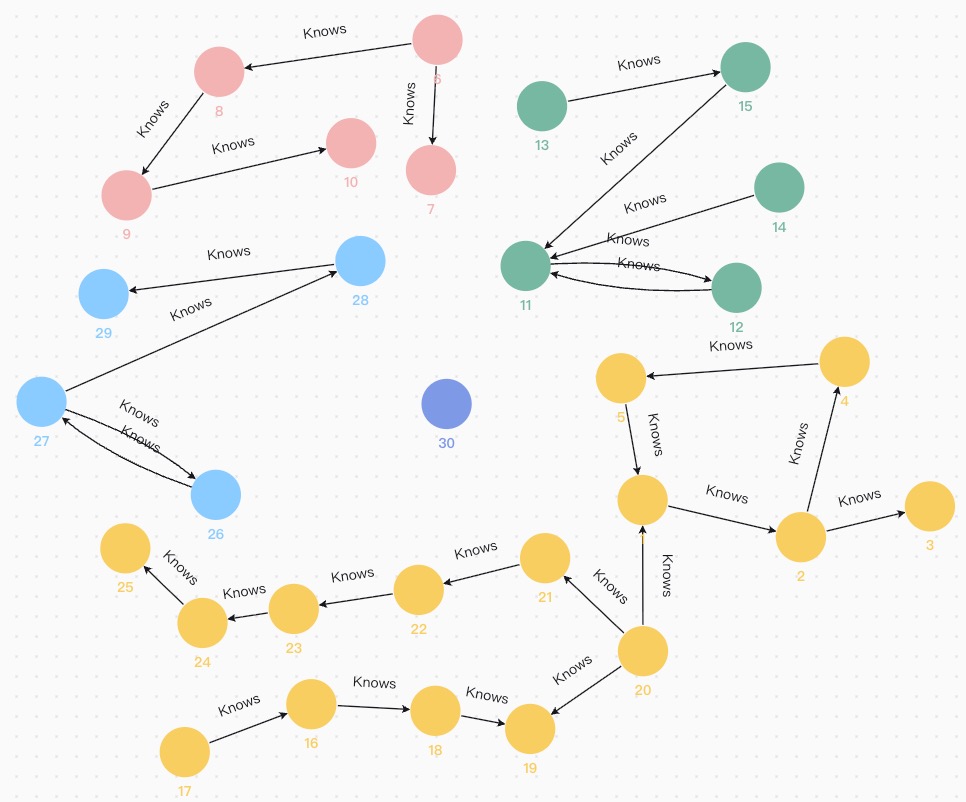
Figure: Relationship between nodes
2. Create a procedure
Choose an output option and run the procedure definition in that tab. Use the same option when calling it.
'''
CREATE OR REPLACE PROCEDURE wcc() RETURNS () AS {
    NODE VALUE  component_id  MinAgg<INT> = 0
    VALUE       comp_count    MapAgg<INT,SumAgg<INT>>
    VALUE       new_active    OrAgg = true
    FILE        output_file_node   {id INT, component_id INT} = DATAFILE {
                              PATH: "file:///examples/algorithms/wcc/output/nodes",
                              FORMAT: "CSV"
                              }
    FILE        output_file_count  {component_id INT, count INT} = DATAFILE {
                              PATH: "file:///examples/algorithms/wcc/output/counts",
                              FORMAT: "CSV"
                              }
    VALUE       v_set         ACTIVE_SET

    MATCH (a@Person)
    PER NODE (a) {
      SET a.@component_id = a.id
    }
    FINALLY {
      SET v_set = a
    }

    WHILE @new_active = true THEN {
      SET @new_active = false
      MATCH (a@Person)-[e@Knows]-(b)
      WHERE a.@component_id < b.@component_id
            AND a IN v_set
      PER PATH {
        SET b.@component_id += a.@component_id
        SET @new_active += true
      }
      FINALLY {
        SET v_set = b
      }
    }

    MATCH (a@Person)
    PER NODE (a) {
      SET @comp_count += TUPLE(a.@component_id, 1)
      EXPORT a.id, a.@component_id INTO output_file_node
    }

    FOR r IN @comp_count
    EXPORT r._0, r._1 INTO output_file_count

}
'''
'''
CREATE OR REPLACE PROCEDURE wcc() RETURNS (component_id INT64, count INT64) AS {
    NODE VALUE  component_id  MinAgg<INT> = 0
    VALUE       new_active    OrAgg = true
    TABLE       result_table  TYPED TABLE {id INT, component_id INT}
    VALUE       v_set         ACTIVE_SET
    MATCH (a@Person)
    PER NODE (a) {
      SET a.@component_id = a.id
    }
    FINALLY {
      SET v_set = a
    }
    WHILE @new_active = true THEN {
      SET @new_active = false
      MATCH (a@Person)-[e@Knows]-(b)
      WHERE a.@component_id < b.@component_id
            AND a IN v_set
      PER PATH {
        SET b.@component_id += a.@component_id
        SET @new_active += true
      }
      FINALLY {
        SET v_set = b
      }
    }
    MATCH (a@Person)
    PER NODE (a) {
      EXPORT a.id, a.@component_id INTO result_table
    }
    FOR r IN result_table
    RETURN r.component_id AS component_id, count(*) AS count GROUP BY (component_id)
}
'''
3. Call your procedure
Compute weakly connected components. Select the same output option used when creating the procedure.
USE #wcc_graph CALL wcc() FINISH
This call writes the results to CSV files and does not return a table in the console.
On the Docker host, find both outputs under your deployment directory:
examples/algorithms/wcc/output/nodes/: The component assigned to each node.examples/algorithms/wcc/output/counts/: The node count for each component.
Example contents of a component count file:
"r._0","r._1"
30,1
26,4
11,5
6,5
1,15
r._0 and r._1 represent the smallest node ID and the number of nodes in each component, respectively.
USE #wcc_graph CALL wcc() RETURN *
Return:
+--------------+-------+
| component_id | count |
+--------------+-------+
| 1            | 15    |
| 6            | 5     |
| 11           | 5     |
| 26           | 4     |
| 30           | 1     |
+--------------+-------+
component_id and count represent the smallest node ID and the number of nodes in each component, respectively.
These results match the figure Relationship between nodes above.
Write results to a graph
To persist WCC results in a graph, see EXPORT.