Single-Source Shortest Paths (SSSP)
Algorithm introduction
Single-Source Shortest Paths computes the minimum path distances from a given source node to all other nodes in a weighted graph. When all edge weights are non-negative, classical solutions include Dijkstra’s algorithm; for general weights (possibly negative) without negative cycles (all edge weights in a path sum to negative), Bellman–Ford algorithm is applicable.
This implementation uses Dijkstra’s algorithm, which requires non-negative edge weights. It maintains an active set and, in each iteration, relaxes only the outgoing edges of nodes in this set. Node distances are updated iteratively until no further updates occur in an iteration.
- Initialize each node’s tentative distance to "infinity", and set the source node’s distance to
0. - Repeatedly relax the outgoing edges of nodes from the current set: for an edge (
u -> v) with weightw, ifdist[u] + w < dist[v], updatedist[v]and addvto the next set. - Continue until no updates occur in an iteration.
For more information about SSSP, see Single-source shortest paths.
Data model
To implement the SSSP algorithm in GQL, the following data model is used to create a graph type:
- Locations are represented by nodes of type
Place. - Connections between locations are represented by directed edges of type
Connectwith a numeric propertydistance(the edge weight).
For the complete definition of the graph type, see Prepare graph data.
Procedure implementation
To compute the shortest path distances from a single source to all nodes in a graph, a procedure is created to implement the SSSP algorithm with set-based relaxation.
For the complete definition of the procedure, see Create a procedure. The following section describes the key components of the procedure and how it works.
The procedure takes the following input parameter:
s: The source node ID.
Additionally, the following variables are defined within the procedure:
| Variable | Type | Description |
|---|---|---|
min_dist |
Node-attached MinAgg aggregator value variable | The current distance for each node. Initialized to a large "infinite" value; for the source node, the distance is set to 0. MinAgg ensures a node keeps the smallest distance seen so far. |
new_active |
Global OrAgg aggregator value variable | A global boolean flag indicating whether any distance was updated in the current iteration; controls loop termination. |
v_set |
Active set variable | The active set of nodes whose outgoing edges are relaxed in the next iteration. |
output_file |
File variable | A file variable used to specify a file to collect the final distances. |
The following steps outline the logic of the procedure:
- Initialize the
min_distof all nodes to a large value; set the source node’smin_distto0and place the source node into the active setv_set. - Repeat while
new_activeistrue:- Reset
new_activetofalse. - For each edge (
a -[e]-> b) from nodesainv_set, ifa.@min_dist+e.distance<b.@min_dist, update the value ofb.@min_distand setnew_activetotrue. - Move each updated node
bintov_setfor the next iteration.
- Reset
- After convergence (no updates in an iteration), export each node’s ID and final
min_distintooutput_fileand return the results (optionally ordered by node ID).
Steps
Run the following code blocks in order in the NebulaGraph Studio CONSOLE. For first-time setup, follow Prepare algorithm sample data to check where to run commands and how the directory is mounted.
1. Prepare graph data
-
Create a graph type that matches your data model.
''' CREATE GRAPH TYPE IF NOT EXISTS sssp_graph_type AS { NODE Place (LABEL Place {id INT PRIMARY KEY}), EDGE Connect (Place)-[LABEL Connect {distance INT, MULTIEDGE KEY ()}]->(Place) } ''' -
Download these CSV files and save them with their original names in
examples/algorithms/sssp/under your deployment directory:- sssp_node.csv: Node data.
- sssp_edge.csv: Edge data.
Preview the CSV files
sssp_node.csvid 1 2 3 4 5 6 7 8 9 10 11 12sssp_edge.csvsrc,dst,dist 1,2,3 1,3,4 2,3,2 1,9,9 1,7,9 7,9,2 3,7,1 2,6,999 3,5,1 3,8,1 5,6,2 5,11,5 6,10,1 10,11,1 -
Create a temporary graph based on the graph type and load the data files into the temporary graph.
CREATE TEMPORARY GRAPH IF NOT EXISTS #sssp_graph TYPED sssp_graph_type''' USE #sssp_graph IMPORT INTO GRAPH { NODE (v@Place {id: id}) FROM DATAFILE { PATH: "file:///examples/algorithms/sssp/sssp_node.csv", FORMAT: "CSV", DELIMITER: ',' }, EDGE (id: src)-[e@Connect{distance: dist}]->(id: dst) FROM DATAFILE { PATH: "file:///examples/algorithms/sssp/sssp_edge.csv", FORMAT: "CSV", DELIMITER: ',' } } '''After the import succeeds, run this query in the console to check the node count:
'''
USE #sssp_graph
MATCH (n)
RETURN count(n) AS node_count
'''
The expected
node_countis12. If it differs, check the files and import results before continuing.The relationship between nodes in the temporary graph
#sssp_graphis shown in the figure below: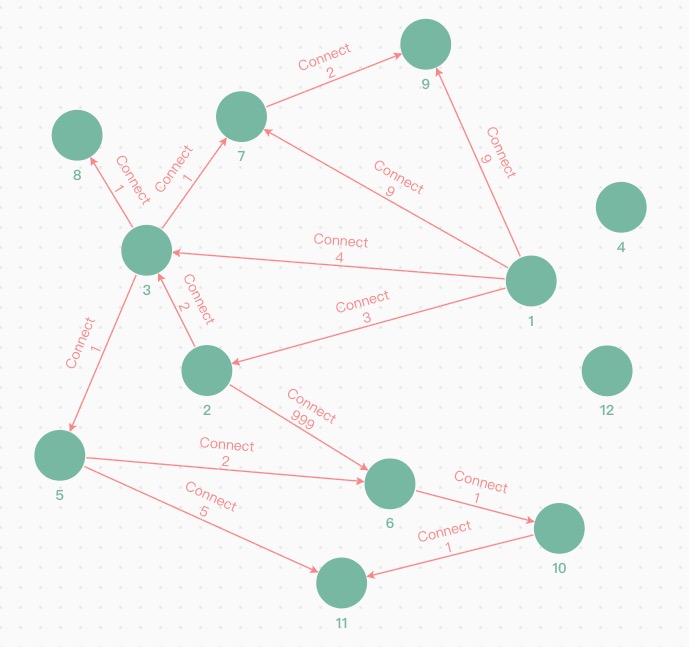
Figure: Relationship between nodes
2. Create a procedure
Create a procedure to implement the SSSP algorithm. For more information about the procedure, see Procedure implementation.
'''
CREATE OR REPLACE PROCEDURE sssp(s INT64) RETURNS () AS {
    NODE VALUE  min_dist        MinAgg<INT> = 10000000007
    VALUE       new_active      OrAgg = true
    VALUE       v_set           ACTIVE_SET
    FILE        output_file     {id INT, min_dist INT}= DATAFILE {
                                    PATH: "file:///examples/algorithms/sssp/output",
                                    FORMAT: "CSV"
                                    }

    // Initialize source
    MATCH (a@Place) WHERE a.id = s
    PER NODE (a) {
      SET a.@min_dist = 0
    }
    FINALLY {
      SET v_set = a
    }

    // Iterate until no updates (convergence)
    WHILE @new_active = true THEN {
      SET @new_active = false
      MATCH (a@Place)-[e@Connect]-(b)
      WHERE a.@min_dist + e.distance < b.@min_dist
            AND a IN v_set
      PER PATH {
          SET b.@min_dist += a.@min_dist + e.distance   // MinAgg applies min()
          SET @new_active += true                       // OrAgg turns true if any update happens
      }
      FINALLY {
        SET v_set = b
      }
    }

    // Collect results
    MATCH (a@Place)
    PER NODE (a) {
      EXPORT a.id, a.@min_dist INTO output_file
    }
}
'''
3. Call your procedure
Call the procedure to compute shortest path distances from source node 1.
USE #sssp_graph CALL sssp(1) FINISH
This call writes the results to CSV files and does not return a table in the console.
On the Docker host, open the CSV files in examples/algorithms/sssp/output/ under your deployment directory. Example contents:
"id","min_dist"
1,0
2,3
3,4
4,10000000007
5,5
6,7
7,5
8,5
9,7
10,8
11,9
12,10000000007
min_dist is the length of the shortest path from source node 1 to each node using the distance property as edge weight. Nodes 4 and 12 are unreachable from node 1 in this graph, shown as the initial "infinite" value (10000000007).
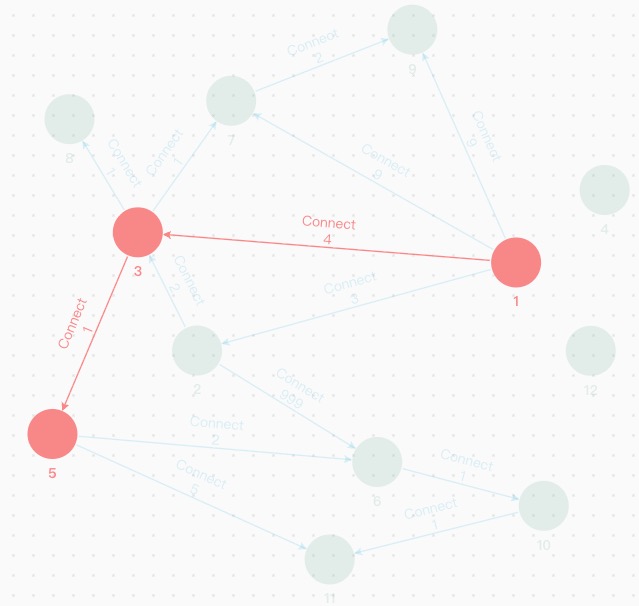
These results match the figure Relationship between nodes above. For example, the shortest path from node 1 to node 5 is 1 -> 3 -> 5, with a distance of 5, as shown in the figure.
Write results to a graph
If you need to persist SSSP results in a graph, use the same write-back pattern described in EXPORT:
- Export SSSP output fields to a table variable first (typically
idandmin_dist). - For a remote graph, split rows with
table_split(...)and send batchedUSE + INSERTstatements vianebula_exec.
Define the target graph type to store shortest-path distance (for example, a min_dist property on Place).