Graph data concepts
A movie connects actors, directors, and viewers. By following these relationships, you can find the movies an actor appeared in, the directors they worked with, and those directors' other work. This topic uses movie data to explain how a graph database organizes data with nodes, edges, and properties so you can query these relationships.
Nodes, edges, and properties
- A node represents an object, such as a movie or an actor.
- An edge connects two nodes and represents their relationship. Each edge has a direction: an acting relationship points from an actor to a movie.
- Properties are named values that describe a node or an edge. A movie node has
idandnameproperties. AWatchedge represents a user watching a movie, and itsrateproperty records the user's rating.
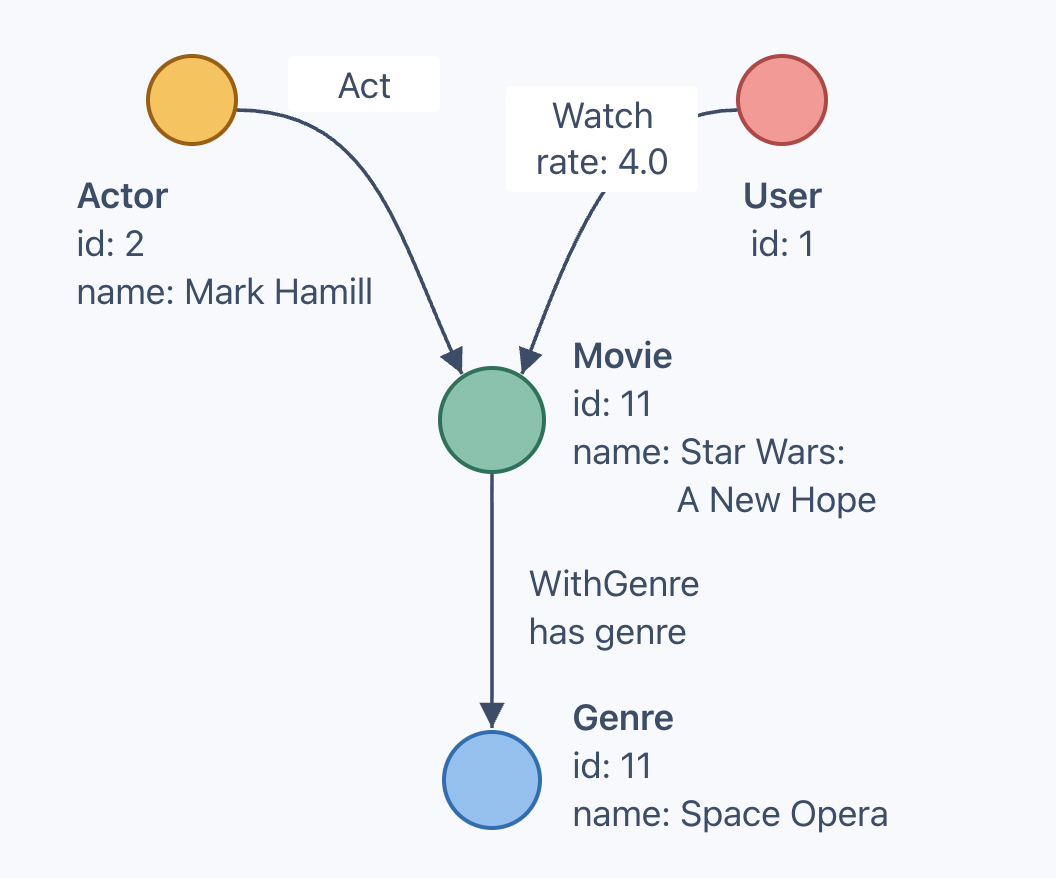
The following diagram uses the built-in movie dataset. Circles represent objects, and arrows represent relationships. Node types and properties appear beside the circles; the rate property appears on the Watch edge. See Example dataset for the full data model.
Node identifiers
Every node type in this dataset uses id as its primary key to identify a node. Within a graph:
- Two nodes of the same type cannot share an
id. - Nodes of different types can share an
id. For example, the movie and genre above both haveid: 11.
Movies can also share a title, so use the ID to look up a specific movie.
Types and labels
Types define structure
A type defines the structure of a node or an edge, including property names and data types. In this dataset, Movie and Actor are node types, and Act is an edge type.
An edge type also specifies which node types it connects: Act goes from Actor to Movie.
Labels match data
To query all the people in the dataset, you need to match actors, directors, and users across their separate node types. A label is a marker used to match nodes or edges in queries. Multiple types can share a label: Actor, Director, and User all carry Person.
The following diagram shows these types and their property names:
PersonActorid,name,birthDateDirectorid,name,birthDateUserid
Types that share a label can have different properties. User has only id, while Actor also has name and birthDate. A query that matches Person cannot assume that every matched node has a name property.
Match by type or label
In Graph Query Language (GQL), you can match nodes by type or label:
| Match by | Pattern | Matching nodes |
|---|---|---|
| Type | (v@Actor) |
Actors only |
| Label | (v:Person) |
Actors, directors, and users |
In these patterns:
- Parentheses
()mark a node pattern, which describes the nodes to match. @Actorspecifies the node type;:Personspecifies the label.vis a node variable that lets you refer to the matched nodes elsewhere in the query. You can choose another name, such asmorperson, as long as you update every reference to it in the query.
See Node patterns for more syntax.
Graph types and graphs
A graph type defines the node types, edge types, and properties a graph can contain. movie_type defines the structure used by the movie dataset.
A graph stores the actual nodes, edges, and property values. The movie graph uses movie_type, so its data must follow that structure.
- Graph type:
movie_type Movienode type definitionid: INTname: STRING
- Graph:
movie One
Movienodeid: 11name: Star Wars: A New Hope
The graph is named movie; Movie is a node type inside it. These names are case-sensitive.
Schema
A Schema is a namespace that organizes graph types and graphs, similar to a directory within the database. Each Schema has a path.
The system creates /default_schema automatically. The quick start creates both movie_type and movie in this Schema, so you do not need to create another Schema for the tutorial.
Sessions and working graphs
A session holds context between queries, including the current Schema and working graph. In the default configuration, a new session starts in /default_schema. Unless you specify a different path, graph types and graphs are created or found in the session's current Schema.
A working graph is the graph a query accesses. You still need to select a working graph after loading data: loading the movie dataset creates the graph and inserts data, but does not select it as the working graph.
Before running a query that accesses graph data, such as MATCH, set the working graph for the session or specify a graph with USE at the start of the query:
| Method | Syntax | Applies to |
|---|---|---|
| Session setting | SESSION SET GRAPH movie |
Subsequent queries in the same session |
| Query prefix | USE movie |
That query only |
A graph specified in the query takes precedence over the session setting and does not change the session's working graph.
See Select the graph and find a movie for complete examples of both methods.
When you create a new session after reconnecting or switching clients, specify the graph again before querying its data. Existing data remains available; reconnecting does not require you to load it again.
Concept summary
| Area | Purpose | Concepts |
|---|---|---|
| Data | Store actual objects, relationships, and values | graph, node, edge, property value |
| Structure | Define the data a graph can contain | node type, edge type, graph type, property definition |
| Query | Match and refer to data | label, node variable, pattern |
| Session | Locate and select the graph to query | current Schema, working graph |
Next step
Follow the Connect and run your first query to load the movie sample dataset and query a movie and its actors.